Introducing Skills with Targets and Behavior Goals
Release Recap
This CR Essentials release introduces target-based Skills, which include Task Analysis and automatic phase changes, and phase-based Behavior Goals.
Skills with Targets
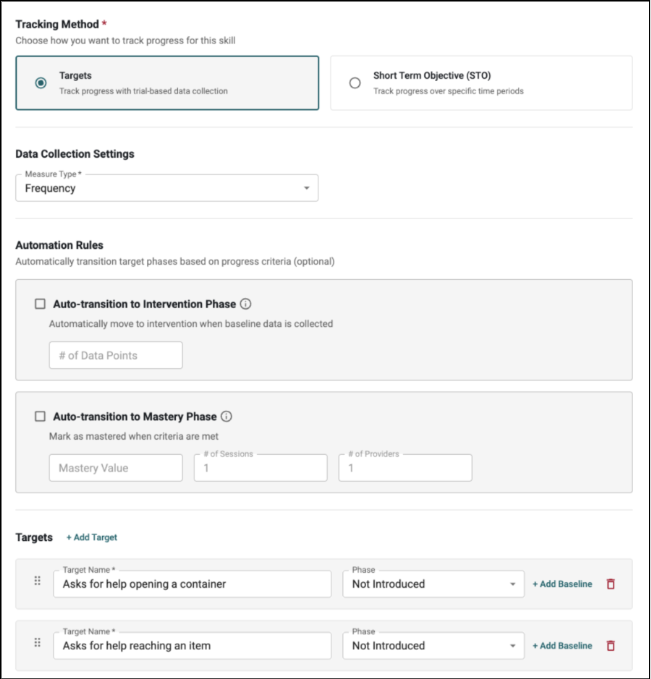
Skills can now be tracked through individual Targets, each with its own phase, as an alternative to time-based Short-Term Objectives. When assigning a skill from a client's Skills & Behaviors tab, the Create Skill page now offers Targets as a Tracking Method next to Short-Term Objective (STO). Please note, existing STO skills will continue to work as before.
- Targets are defined in the Skill Library, which now includes a Targets column under each Short-Term goal, and they appear in the Selection Preview when choosing a skill. Targets copied from the Skill Library can be renamed, removed, reordered, or added before saving.
- Each Target moves through the phases "Not Introduced", "Baseline", "Intervention", "Mastered" and "Maintenance", and can have any number of dated baselines added.
- In Session Notes and the mobile app, each Target in "Baseline", "Intervention" or "Maintenance" gets its own data collection block, based on the Target phase at the time of the visit.
- Target phases can be edited in the new Phase History section in the Skill's details page.
- A Target that already has data on a note stays on that note, even if its phase changes later.
- Measure Type options include Frequency, Percent Correct, Duration, Rate, and now, Task Analysis.
- Percent Correct and Task Analysis skills both support Trial Ranges.
- Once a Skill is saved, its Measure Type and phases of saved Targets are locked. New Targets can still be added when editing.
- Deleting a Target permanently removes it and its collected data. The last remaining Target of a Skill cannot be deleted.
- "View Graph" shows an overview graph with every Target and the "% of Targets Completed", followed by one graph per Target with its phase lines.
- Monthly reports include the same graphs, with a dropdown to choose which Skill and Target graphs are shown. The selection is saved and included in exports.
Task Analysis and Automatic Phase Changes
Two new options are available exclusively for Skills tracked by Targets: Task Analysis and automatic phase changes.
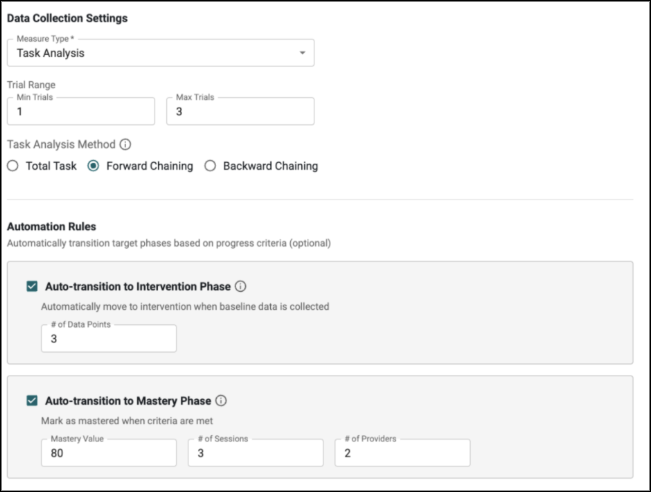
- Selecting Task Analysis as the Measure Type displays the Task Analysis Method options "Total Task", "Forward Chaining" and "Backward Chaining".
- With "Total Task", every step is collected in each session.
- With "Forward Chaining" or "Backward Chaining", only the current step is collected, and the other steps are shown as view-only.
- When a chained step is mastered, the next step moves to "Intervention" automatically.
- The optional "Automation Rules" section configures when Targets advance. Automatic changes are added to the Target's Phase History section on the date of the qualifying data point, and each rule applies once per target.
- "Auto-transition to Intervention Phase" moves Target out of "Baseline" after the set amount of data points is reached, counting both baselines and session data.
- "Auto-transition to Mastery Phase" moves a target to "Mastered" once it reaches the "Mastery Value" over the set "# of Sessions" and "# of Providers".
- Mastery requires consecutive qualifying sessions. Caregiver-collected data and manual baselines do not count toward mastery.
- Please note, Task Analysis and automatic phase changes are not available for Behavior Goals or STO skills.
Behavior Goals
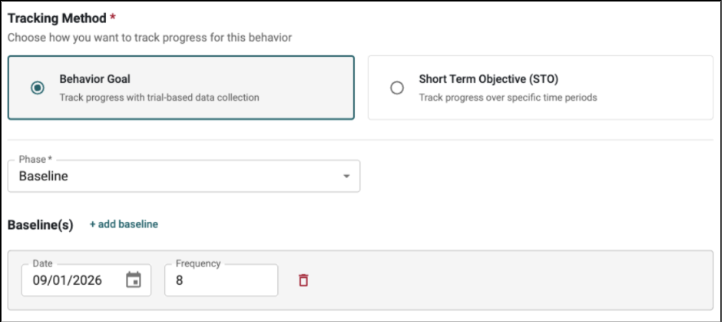
Behaviors can now be tracked as a Behavior Goal, which follows the behavior through phases instead of reduction STOs. When assigning a behavior from a client's "Skills & Behaviors" tab, the "Create Behavior" step now offers "Behavior Goal" as a "Tracking Method" next to "Short Term Objective (STO)".
- The Behavior Details page displays a summary of the Behavior's progress. Fields include "Topography", "Measure Type" and "Last 3 Measurements", along with "View Graph" and an inline "Phase History".
- Measure Type covers frequency, rate, intensity, intervals, and average or total duration, with the unit built into each option.
- A Behavior Goal starts in a selected "Phase" and can include dated baselines. Phases are added, edited, and removed from the Phase History section. Behaviors always maintain at least one phase.
- Session Notes and the mobile app show each behavior's phase at the time of the visit.
- Graphs display phase lines and baselines, and monthly reports show each Behavior Goal's phase progress.
- Once a Behavior Goal is saved, its "Measure Type" and starting phase are locked, and later phase changes are made from the "Phase History".
- Please note, phase changes for Behavior Goals are made manually, since automatic phase changes and Task Analysis apply only to Skills with Targets. Existing STO behaviors continue to work as before.