
How To: Add Targets in the Skill Library
Skills are configured at an organization level in the Skill Library. Each skill is organized as a Long-Term Goal, the Short-Term Goals within it, and the Targets within each Short-Term Goal. Targets added here are copied to a client's skill when it is assigned using CR Essentials Standard.
To open the Skill Library:
- In the top navigation menu, click on Settings.
- Select Behavior Analysis.
- Select Skill Library from the dropdown.

To add Targets to a Short-Term Goal:
- Select a Long-Term Goal from the first column.
- Select a Short-Term Goal from the second column.
-
Click +Add New under the Target column.
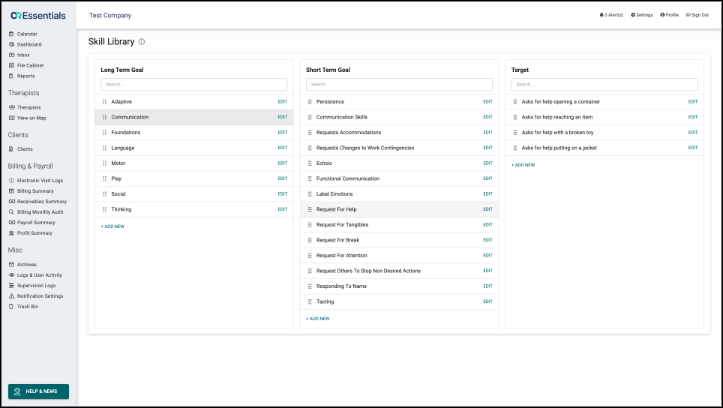
- Enter the Target name
- Click the check mark to confirm.
- To change the order of the Targets, drag them up or down. Clear the search box first if you have searched.
- To rename a target, click EDIT next to it.
Short-Term Goal Details
The Description, Teaching Instructions, and Required Materials belong to the Short-Term Goal and are shared by all its targets.
To update these fields:
- Click Edit next to the Short-Term Goal.
- Once edits have been made and reviewed, click Save.

Please note, archiving or deleting a Long-Term Goal or Short-Term Goal also impacts every Target within it.
Changes to the Skill Library do not affect Skills already assigned to clients. Changes apply the next time the skill is assigned.