
How To: Use Task Analysis and Automation Rules
Task Analysis and Automation Rules are available only for Skills tracked by Targets.
Task Analysis
With Task Analysis, each target is a step of the task.
To configure Task Analysis:
- On the Create Skill page, select Targets as the Tracking Method.
- Select Task Analysis as the Measure Type.
- Select a Task Analysis Method:
- Total Task: Every step is taught and collected in each session.
- Forward Chaining: Steps are taught one at a time, starting from the first step.
-
Backward Chaining: Steps are taught one at a time, starting from the last step.
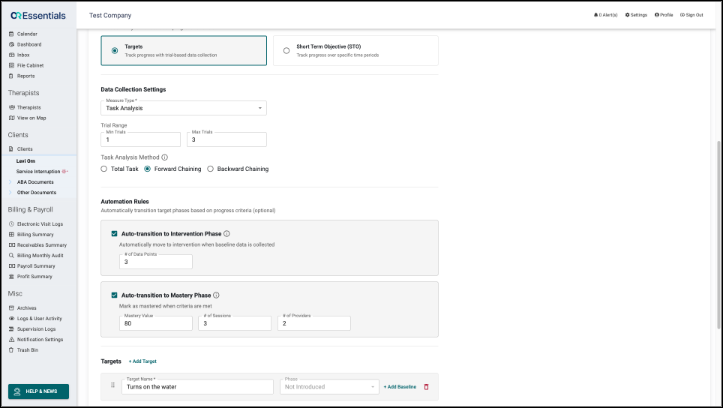
- If needed, set the Trial Range with Min Trials and Max Trials.
- Add the task steps in the Targets section, in the order they are performed.
With Task Analysis, the phase of each step is set automatically, so the Phase fields cannot be edited.
- With Total Task, every step starts in Intervention.
- With Forward Chaining, the first step starts in Intervention and the other steps start in Not Introduced.
- With Backward Chaining, the last step starts in Intervention.
When a chained step is mastered, the next step moves to Intervention automatically. These changes appear in the Target's Phase History with Task Analysis as the source.

Automation Rules
Automation Rules is an optional, configurable section that moves Targets to the next phase automatically.

- Auto-transition to Intervention Phase: Targets in Not Introduced or Baseline move to Intervention once the set # of Data Points has been captured. Both baselines and session data count.
- Auto-transition to Mastery Phase: Targets move to Mastered once they reach the Mastery Value over the set # of Sessions, with data from at least the set # of Providers.
When the mastery rule is on, the Skill's Details page displays the criteria. For example, "A target is mastered when at least 80 is achieved across 3 consecutive sessions with a minimum of 2 providers."
Automatic changes are added to the Target's Phase History section when the session data that meets the rule is saved, with Auto Progression as the source. Each rule applies only once per Target, and phases can still be changed manually at any time.
In the example below, the first step was mastered automatically. Because the skill uses Forward Chaining, the next step then moved to Intervention.

Please note:
- Mastery requires consecutive sessions that meet the Mastery Value.
- Caregiver-collected data and manual baselines do not count toward mastery.