
26.11: Claim Workflow Improvements and Other Enhancements
Release Recap
The CR Essentials 26.11 release introduces claim workflow improvements that give billers more control over claim status, including marking claims as “Sent” externally and moving claims back to “Draft,” along with other enhancements and fixes.
The following has been released:
Claim Workflow Improvements
New tools have been introduced for Billers to keep each claim's status accurate, correct claims before sending them again, and to see why a claim's status changed.
Mark Claims as Sent Externally
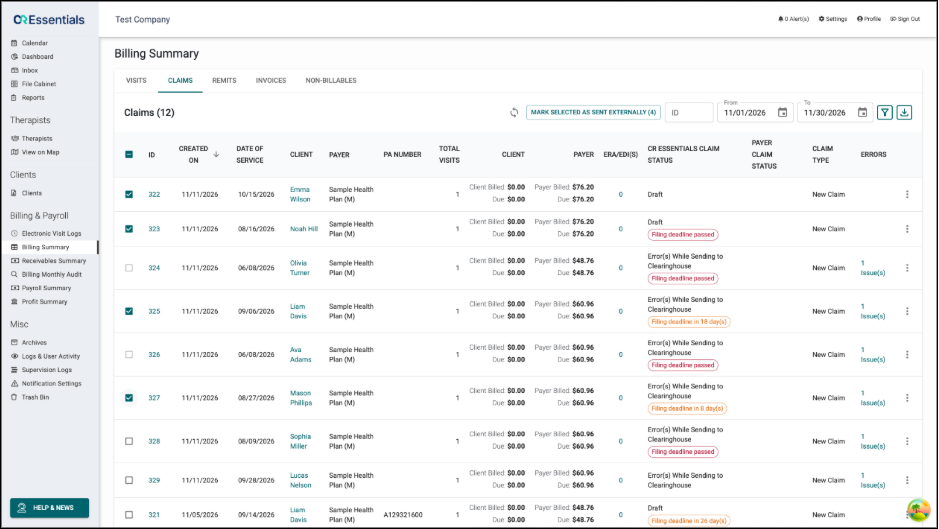
Billers can now record claims that were billed outside CR Essentials, such as through another clearinghouse, on paper, or on the payer's website. The "Mark as sent externally" option is available in the claim's row menu on the Billing Summary "Claims" tab. To mark several claims at once, select them and click "Mark selected as sent externally".
- This option is available for claims in “Draft” or “Error” status, and up to 200 claims can be marked at once.
- A reason is required: "Billed through another clearinghouse", "Paper claim (mail or fax)", "Entered on the payer's website", or "Other." A note can also be added.
- Claims marked as “Sent” externally are not sent by CR Essentials and are included in Receivables.
Back to Draft
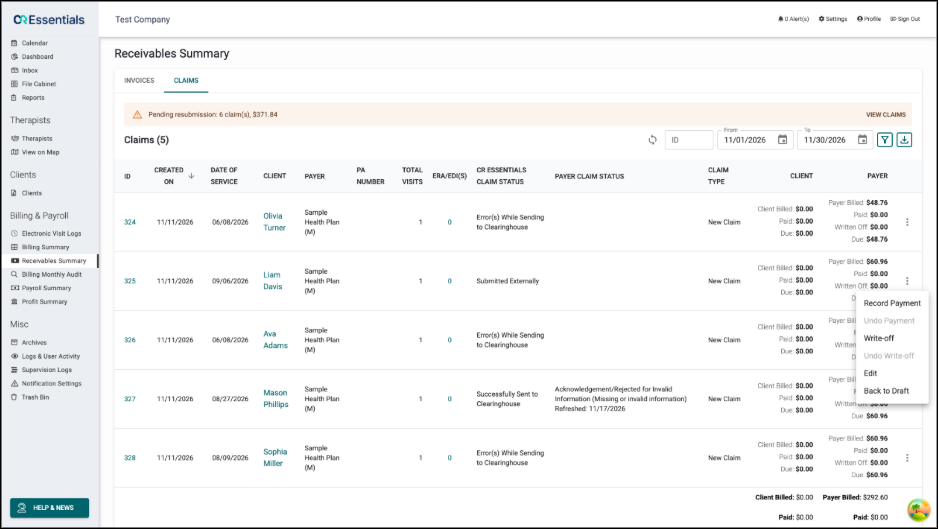
Billers can now move a claim back to “Draft” to correct it and send it again, using the "Back to Draft" option in the claim's row menu on the Billing Summary and Receivables pages. The reason is saved in the claim's history. The Back to Draft option is available for:
- Claims marked as “Sent” externally that have no payments, write-offs, or invoices posted.
- Claims in “Error” status.
- Sent claims that the payer rejected, as long as nothing shows the payer has accepted the claim. This requires the new "Revert Claims To Draft" role permission, which admins have automatically.
- A reason is required: "Payer rejected it," "Fix wrong information," "Duplicate claim," "Marked or sent by mistake," or "Other."
- A new "Pending resubmission" tile on the Receivables page shows the number and total amount of claims moved back to Draft, and "View claims" opens the list.
- Please note, the "Resubmit" option on the Receivables page has been replaced by "Back to Draft.
More Claim Improvements
- Payers can now have a "Timely filing limit (days)" on the Payer edit page and claims within 30 days of the limit or past the limit display a filing deadline warning.
- The claim history now includes a "Reason" column and shows who made each change, including changes made by CR Essentials Support or by the system.
- When the clearinghouse is temporarily unavailable, claims are now retried automatically for up to three days, and the claim displays a message explaining the automatic retry.
- When a claim cannot be sent, the message now explains why, such as a payment already being posted on the claim or the claim currently being sent.
Other Enhancements
- A new "Show payer on each visit" setting under "NOTE DISPLAY OPTIONS" in Company Settings allows admins to hide the payer line shown on each visit in Session Notes and Analyst Notes.
- A new "Group session data by visit" setting under "NOTE DISPLAY OPTIONS" in Company Settings displays behavior and skill data under one heading per visit instead of repeating the visit time on every line.
- The "Summary Label," "Session Data Label,” and "Narrated Note Label" can now be renamed in the Data Collection block of a custom form in the form builder, for notes on the web.
- Payers now have an "Add header with client: name, birthdate, and insurance id" setting under Custom Form Session Notes that repeats the client header on every page of custom form Session Note PDFs.
- The in-progress step of a client's CR Elements program can now be edited, including its name, description, and target names, while keeping its collected data and graph history. Please note, renaming a target updates existing notes.
- Minor platform performance, security, and visual improvements have been implemented.