
How to De-activate an Employee User Type
CR Essentials is billed 1) by the number of active employee seats/users (listed under Settings>General Settings>Company Users) and 2) active therapist profiles in the account (listed in therapists' tab).
Note: An active therapist profile in the therapists' tab will be counted towards the CR Essentials monthly invoice even if there is no user associated to it in the company users screen. As a reminder a therapist account and a dual user exists in two places 1) therapist profile under the Therapists' Tab and 2) a user login under Settings>General Settings>Company Users. If either of those elements are active in the account, they will be counted towards the monthly invoice.
- Admins - A CR Essentials account needs to have an administrator so the administrator can't be deleted. Reach out to support if you wish to cancel your CR Essentials subscription.
-
Superusers - To deactivate a superuser, go to Settings > General Settings > Company Users, locate them on the list, click on the three dots and then delete.
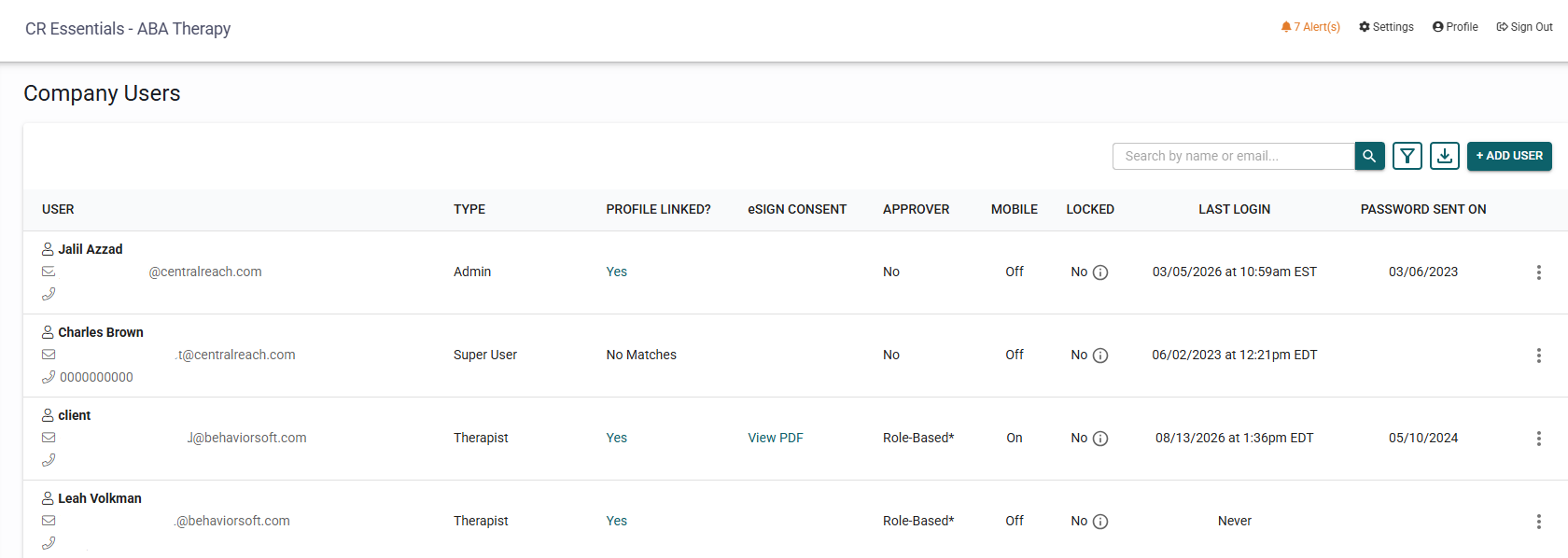
- Therapist - To deactivate a therapist, go into the therapist tab, open up the therapist's profile, and click on the archive button on the top right corner.

This will automatically delete the user from Settings > General Settings > Company Users. If the therapist profile and the company user are deleted, said therapist will not be included on the company's next invoice. If the user is deleted but the therapist profile remains visible in the therapist tab, it will count towards the seat count used to calculate your CR Essentials invoice.
- Dual user - To deactivate a dual user you will have to 1) archive the therapist profile just like the therapist in item 3 and 2) going to Settings > General Settings > Company Users, locate them on the list, click on the three dots and then delete just like in item 2.